

Audit Programs
An Audit Program groups related audits together — for example all audits planned for a fiscal year, a themed audit series, or all supplier audits for a specific category. It provides a planning envelope with a shared time horizon.
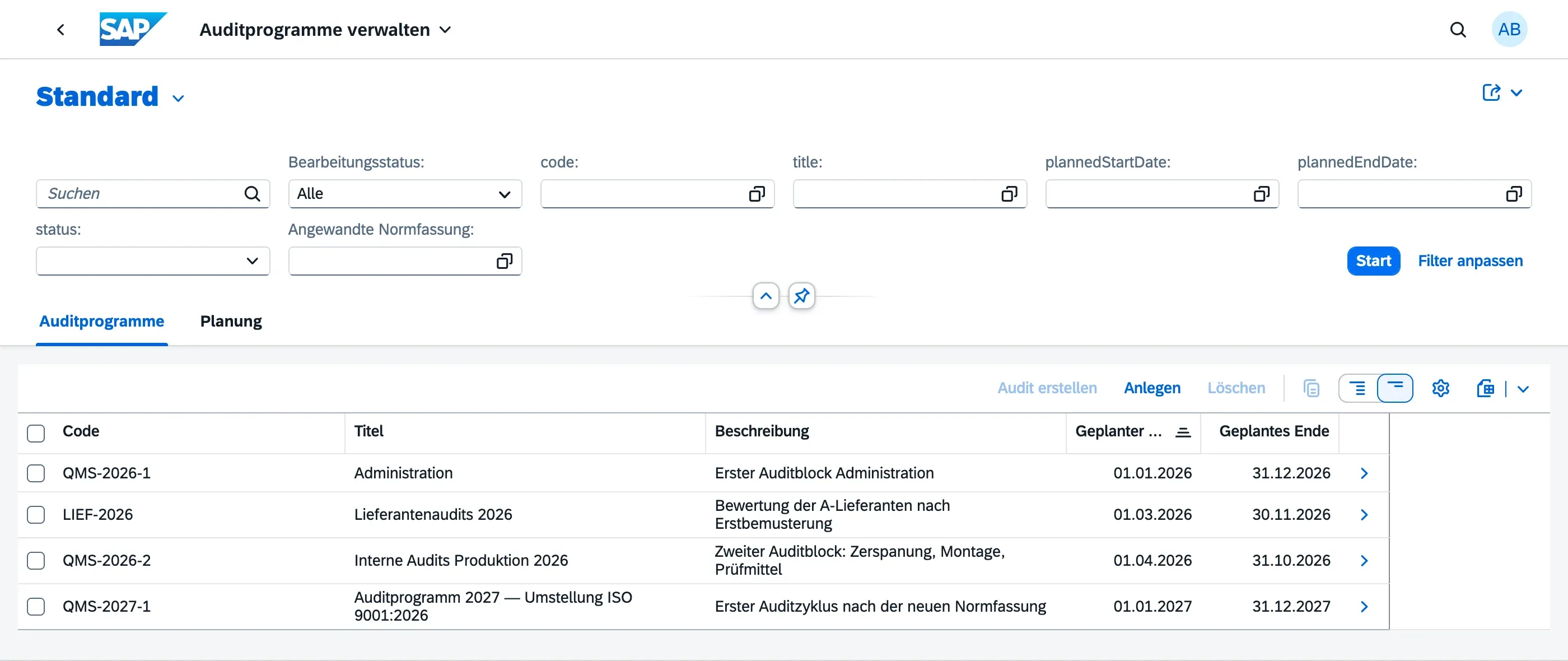
Creating an Audit Program
Section titled “Creating an Audit Program”- Navigate to Audit Programs in the Launchpad
- Choose Create
- Provide:
- Title — e.g. “Annual Internal Audit Program 2026”
- Code — short identifier for the program
- Description — optional free-text description
- Planned Start / End Date — the overall planning horizon
- Risks and Resources — optional notes on risks to the program itself and the resources needed to run it (see below)
- Optionally assign Scope Org Units — the organisational units covered by this program
- Save as Draft
Adding Audits to a Program
Section titled “Adding Audits to a Program”Within an Audit Program:
- Use the Create Audit action to create a new audit directly within the program
- Audits created this way are automatically linked to the program
All audits in a program are visible in the Audits tab of the program object page.
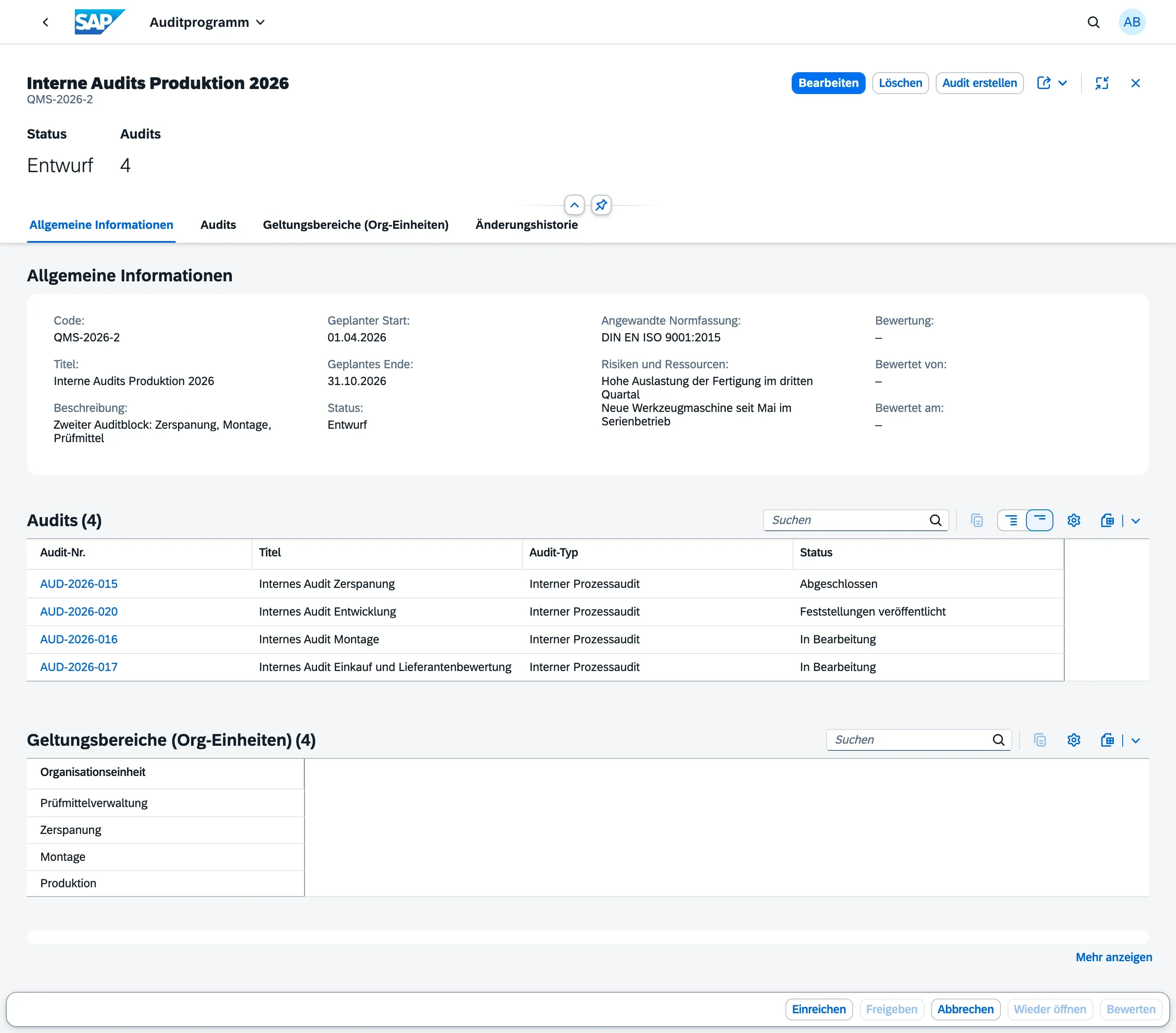
Program Lifecycle
Section titled “Program Lifecycle”Audit Programs follow their own status flow:
| Status | Meaning |
|---|---|
| Draft | Program is being planned; org units and dates can be adjusted |
| Submitted | Program has been submitted for approval |
| Released | Program is officially released; audits are being executed |
| Evaluated | Program has been reviewed after completion — see Evaluating a Program |
| Cancelled | Program was abandoned |
Allowed Transitions
Section titled “Allowed Transitions”| Action | From | To |
|---|---|---|
| Submit | Draft | Submitted |
| Release | Submitted | Released |
| Evaluate | Released | Evaluated |
| Cancel | Draft | Cancelled |
| Reopen | Released | Draft |

Who Can Submit and Release a Program
Section titled “Who Can Submit and Release a Program”Submit and Release are restricted to the Audit Manager role. An Auditor can view a program, add audits to it, cancel a draft, or reopen a released program, but cannot submit it for approval or release it.
This separation reflects ISO 19011:2018, 5.3.2 and the independence principle (clause 4): the decision to approve and release the annual program — including its resourcing and scope — is a planning and governance responsibility, kept separate from the auditors who go on to conduct the audits within that program. Without this separation, a single Auditor could plan, execute, and self-approve their own audit program, undermining the objectivity the standard requires.
Scope Org Units
Section titled “Scope Org Units”You can assign one or more Scope Org Units to a program to indicate which parts of the organisation are covered. This helps with planning visibility and reporting — it does not restrict which org units individual audits within the program can use.
Risks and Resources
Section titled “Risks and Resources”Before releasing a program, it is good practice to think through what could put the program itself at risk — not the organisation being audited, but the program as a planning exercise. Use the Risks and Resources field on the program to note things like:
- Resource shortages (not enough auditor time to cover all planned audits)
- Missing auditor competence for certain audit topics or org units
- Scheduling conflicts with other business activities
- Risks in the communication process with auditees
This is free-text guidance for the program owner and reviewers — the field shows example prompts as placeholder text to help you get started. It is not a formal, structured risk register.
Evaluating a Program
Section titled “Evaluating a Program”Releasing a program is not the end of the story — once its audits have run their course, the program itself should be reviewed to identify improvements for the next planning cycle. This reflects ISO 19011:2018, 5.6, which calls for the audit program to be monitored and periodically evaluated, not just planned and released once.
Use the Evaluate action on a Released program to record this review. Before you can evaluate a program:
- It must be in status Released
- Every audit linked to the program must itself have reached a final status (Findings Published or Cancelled) — if any audit is still in progress, the action is rejected with a message telling you how many audits are still open
When you evaluate a program:
- First, fill in the Evaluation field with your retrospective notes — for example whether the program’s goals were met, what deviated from the plan, and lessons learned for the next program
- Choose Evaluate
- The program moves to status Evaluated, and the system records who performed the evaluation and when (Evaluated By / Evaluated At) — this is a traceable stamp, not something you set yourself
Like Risks and Resources, the Evaluation field is free text with example prompts as placeholder text — it is not a formal, structured scorecard.
Evaluate is restricted to the Audit Manager role, for the same independence reasons as Submit and Release (see above).
When to Use Programs vs. Individual Audits
Section titled “When to Use Programs vs. Individual Audits”| Use Case | Recommendation |
|---|---|
| One-off audit | Create a standalone Audit |
| Recurring or themed audit series | Create an Audit Program and add audits inside |
| Annual audit plan | One Audit Program per year with audits added as they are planned |
- Completing a program does not automatically complete its child audits — manage each audit’s lifecycle independently
- Use the program’s Change History to track all modifications with timestamp and user