

Rating Schemes
A Rating Scheme defines the set of rating options auditors can choose from when answering questions during fieldwork. Every Question Catalog is linked to exactly one rating scheme, so all audits using that catalog share the same rating options.
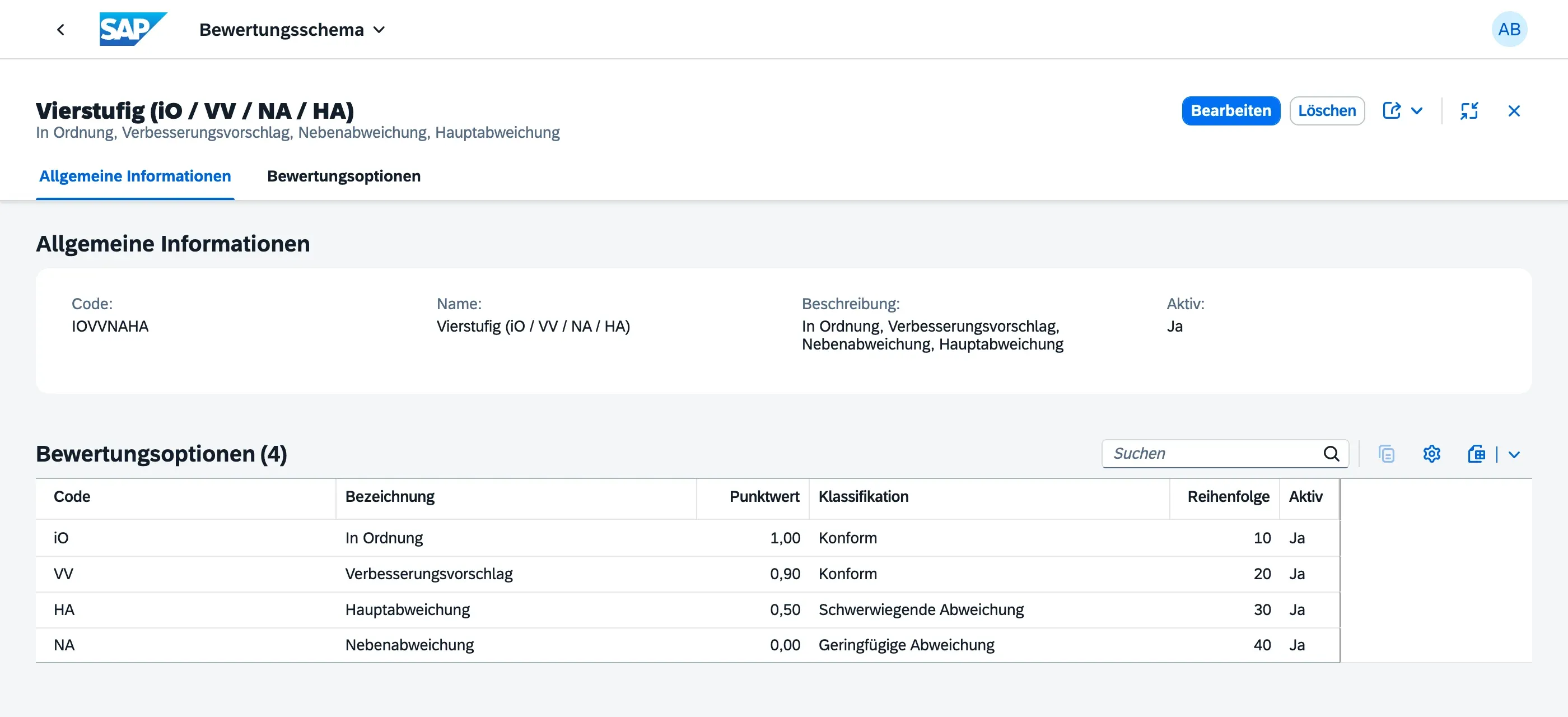
Rating scheme fields
Section titled “Rating scheme fields”| Field | Description |
|---|---|
| Name | Descriptive label (e.g. “ISO 9001 Standard Ratings”) |
| Code | Short identifier |
| Options | List of rating options (e.g. Fulfilled, Partially Fulfilled, Not Fulfilled) |
Rating options
Section titled “Rating options”Each rating option has:
| Field | Description |
|---|---|
| Label | Display text shown to auditors |
| Score | Optional numeric value for scoring/aggregation |
| Classification | The conformity classification this option represents: Conform, Observation, Minor Nonconformity, or Major Nonconformity |
Because the classification lives on the rating option itself, an auditor only needs to pick the option that matches what they observed — the conformity result and, where applicable, the resulting finding severity follow automatically. See Conducting Fieldwork for how this plays out during an audit.
Managing rating schemes
Section titled “Managing rating schemes”Rating schemes are maintained by your Master Data Admin, under Master Data → Rating Schemes. Assign a scheme to a catalog when creating a Question Catalog.
Next Steps
Section titled “Next Steps”- Question Catalogs — where rating schemes are assigned
- Conducting Fieldwork — how ratings are recorded during an audit