

Quality Objectives
A quality objective represents a measurable objective under ISO 9001 clause 6.2 — with a target value, an owner, regular recording of actual values, and an evaluation at the end of the period. Unlike a target list maintained in a spreadsheet once a year, the ongoing recording is the actual benefit here: you can see at any time whether an objective is on target, in the warning band, or requires action — not only at the management review.
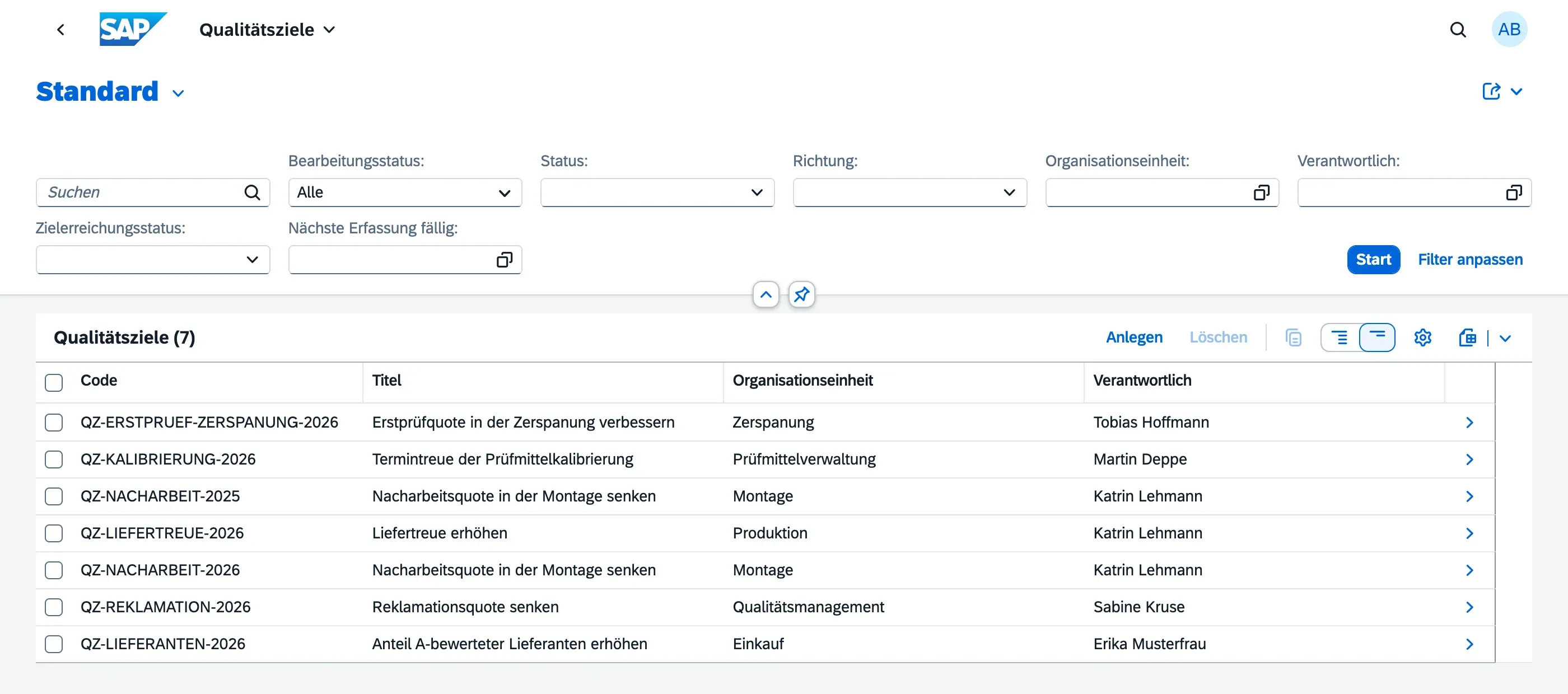
Every user has read access to quality objectives — clause 6.2 is a norm requirement, not a separately licensed module. Only a Quality Manager can create, edit, and evaluate an objective; the person designated as responsible on an objective can additionally record its measurements. See Roles & Permissions for the full picture.
Creating a quality objective
Section titled “Creating a quality objective”- Open Quality Objectives (Qualitätsziele) in the launchpad
- Choose Create (Anlegen)
- Under General Information (Allgemeine Informationen), enter the basics:
- Title and Code — e.g. “Reduce complaint rate”,
QZ-REKLAMATION-2026. The code is free-form; carrying the period in it has proven useful, because each year is its own objective - Description, Org Unit, and Responsible — who owns the recording
- Valid From / To (Laufzeit von / bis) — usually the fiscal year
- Title and Code — e.g. “Reduce complaint rate”,
- Fill in the Planning (Planung) section — these three fields are the clause 6.2.2 requirements most often missing in audits:
- Policy Alignment — what the objective derives from
- Resources — what is required to achieve it
- Evaluation Method — how achievement will be determined
- In the Target Metric (Zielgröße) section, define how an actual value becomes a status (see below)
- Save as draft and switch it live via Activate (Aktivieren)
An objective can reference a parent objective to tie a departmental objective to a company objective — this is a designation only, not an automatic rollup. Neither actual nor target values are inherited from the parent.
Understanding the target metric
Section titled “Understanding the target metric”The target metric is the part that raises the most questions when creating a first objective: from it, qportal derives the status of every individual measurement, without anyone having to judge it.
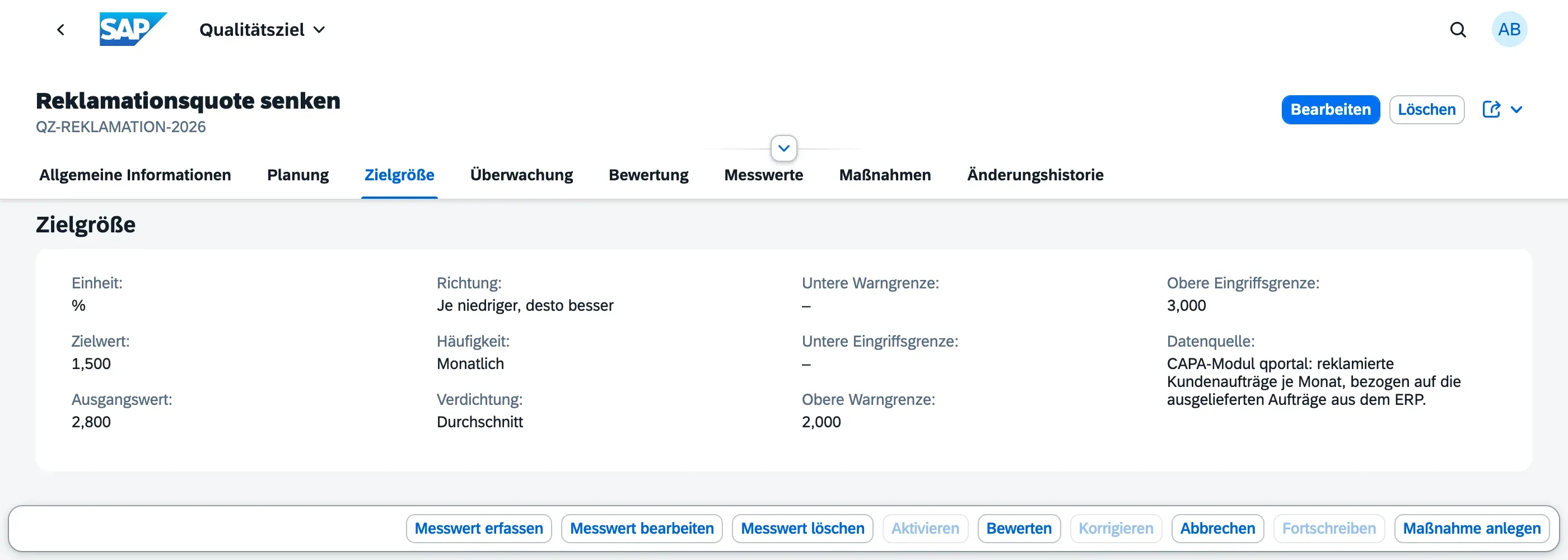
| Field | Meaning |
|---|---|
| Unit | Free text (%, pieces, days, ppm, €). Objectives are never aggregated across units |
| Target Value | The value aimed for at the end of the period |
| Baseline (Ausgangswert) | The value before the improvement started. Optional, but the basis of the achievement percentage |
| Direction | Higher is better, Lower is better, or Range |
| Frequency | Monthly, Quarterly, or Annually — also drives the due-date calculation |
| Aggregation (Verdichtung) | How individual values become one: Average, Sum, Last Value, or Worst Value |
| Lower / upper warning limit, lower / upper action limit | All four optional. Which ones you need depends on the direction |
| Data Source (Datenquelle) | Where the number comes from. Not mandatory — but the second question any auditor asks about a manually recorded value |
Which limits you need. With Lower is better, the upper limits are the effective ones: a value above the upper warning limit is a warning, above the upper action limit it requires action. With Higher is better it is the other way round — there the lower limits apply. Only Range uses all four, because it is bounded on both sides. Without any limits the status still works, but only as two values, On Target and Action Required; the intermediate Warning band exists only once warning limits are set.
A worked example
Section titled “A worked example”The objective “Reduce complaint rate” is configured like this:
| Unit | % |
| Baseline | 2.800 |
| Target value | 1.500 |
| Direction | Lower is better |
| Upper warning limit | 2.000 |
| Upper action limit | 3.000 |
| Frequency | Monthly |
| Aggregation | Average |
Each recorded monthly value then gets its status directly:
- 2.4 % is above the warning limit (2.0) but below the action limit (3.0) → Warning
- 1.9 % is below the warning limit → On Target
- 3.2 % would be above the action limit → Action Required
Note that the target value (1.5) does not enter this calculation at all. The status band measures adherence to the limits, not achievement of the target — that is what the achievement percentage is for.
An objective’s object page
Section titled “An objective’s object page”Everything else happens on the objective’s object page. It is divided into eight sections, reachable directly from the tab bar.
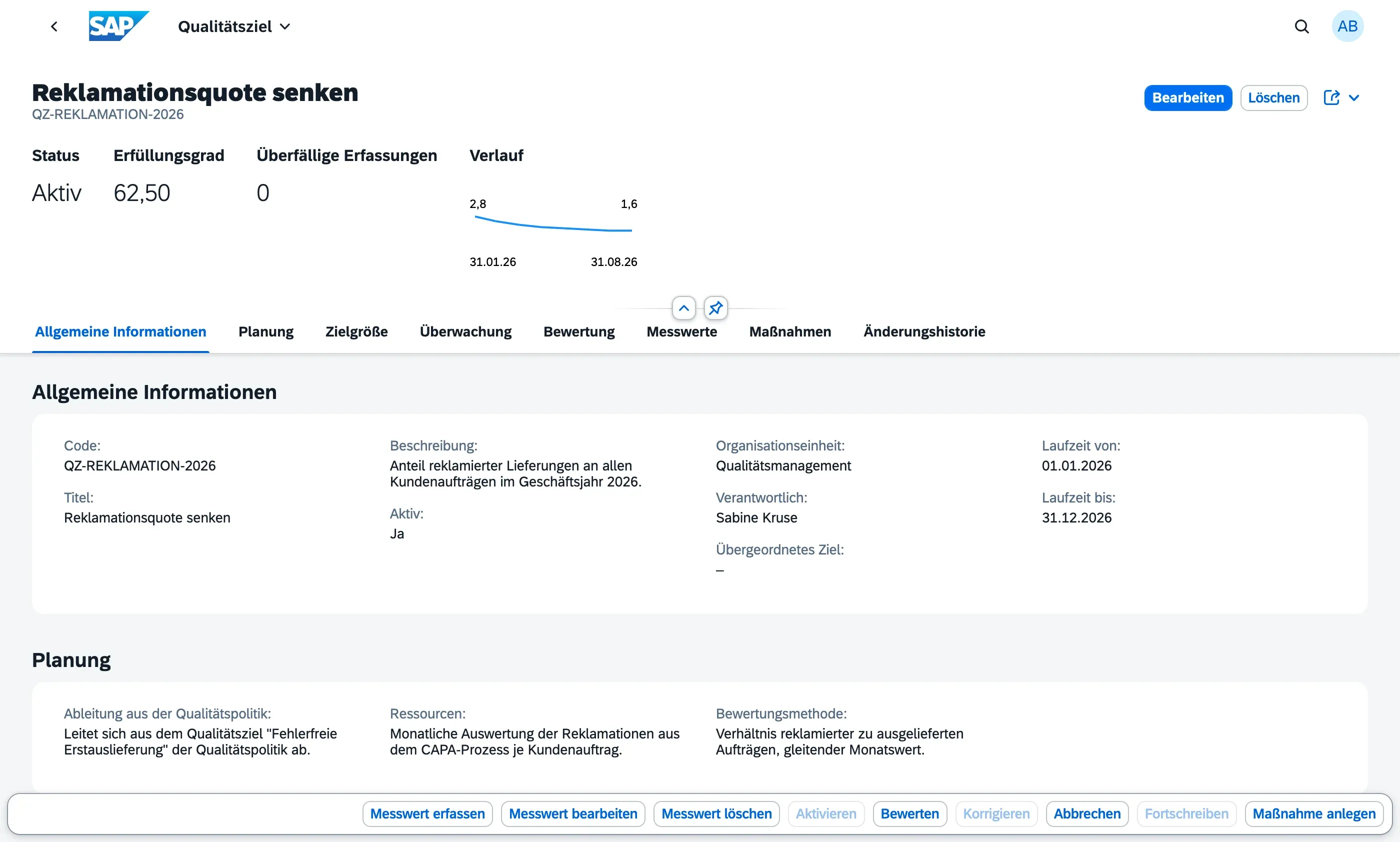
The header area summarises what has to be visible without scrolling:
- Status — the objective’s lifecycle status
- Achievement (Erfüllungsgrad) — see below
- Overdue Measurements — periods that have ended without a recorded value
- Trend (Verlauf) — a curve of the actual values recorded so far, with the first and last value. It shows the direction the objective is moving in, not whether the target is met
Below it follow the sections General Information, Planning, Target Metric, Monitoring (Überwachung, due dates), Evaluation (Bewertung), Measurements (Messwerte), Action Items (Maßnahmen), and Change History (Änderungshistorie).
Recording measurements
Section titled “Recording measurements”Once activated, record the actual value for the completed period via the footer action Record Measurement (Messwert erfassen).
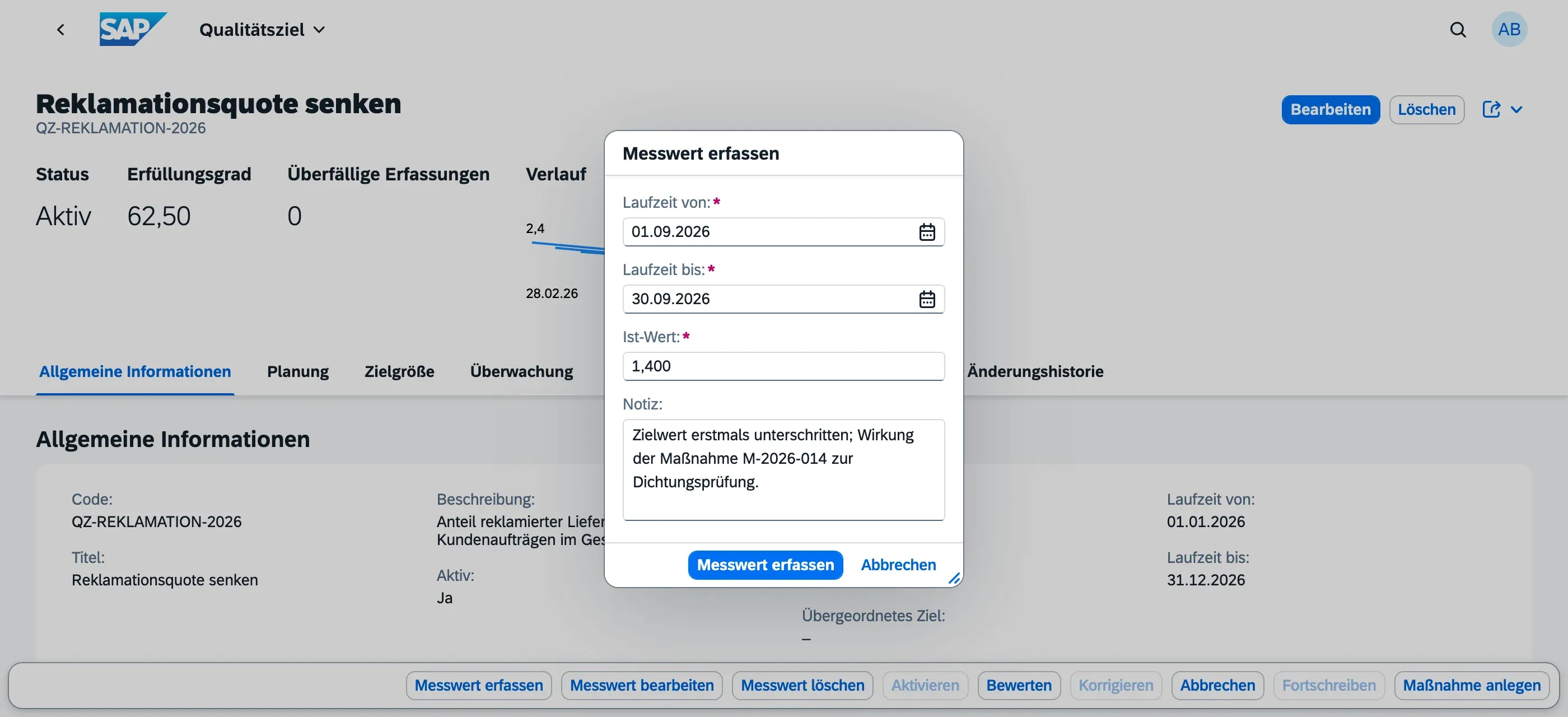
Period from/to and the actual value are mandatory; the Note (Notiz) is optional — it is the place to explain a deviation (“new product line ramp-up in May”) and is often more valuable in an audit than the value itself. qportal derives the measurement’s status (On Target, Warning, or Action Required) from the target metric and records the Value Source (Wertquelle) as Manual for values entered through this dialog.
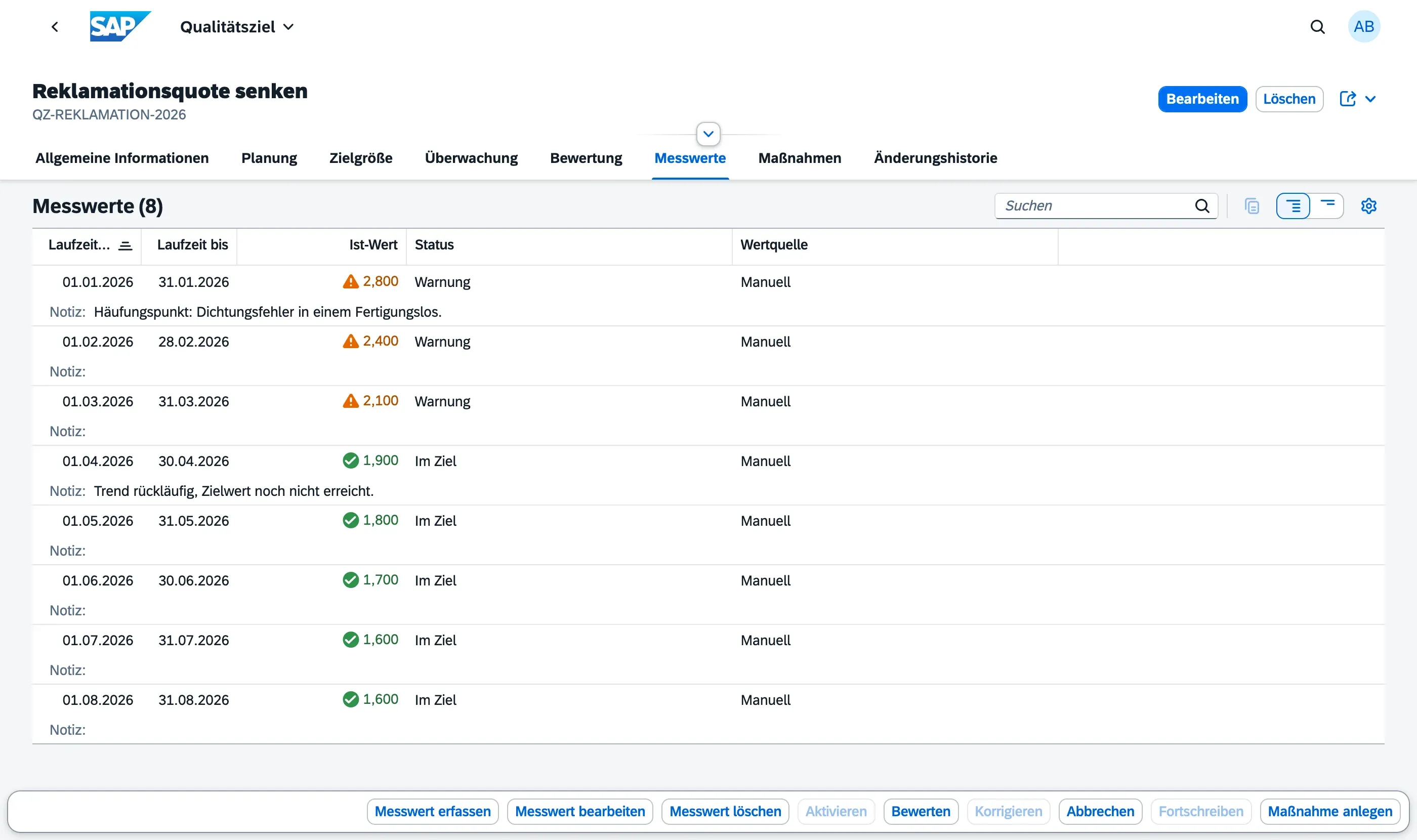
A measurement can be corrected afterwards via Edit Measurement (Messwert bearbeiten). Delete Measurement (Messwert löschen), by contrast, is reserved for the Quality Manager — the objective’s designated responsible person may record and correct values, but not remove them.
If you later change the target value or a limit, the status of every existing measurement is recalculated automatically, so no stored status contradicts the current definition.
Achievement percentage
Section titled “Achievement percentage”The achievement percentage condenses the entire measurement series using the configured aggregation method and expresses the result between baseline and target value: 0 % corresponds to the baseline, 100 % to the target value reached.
Three things about it are easy to misread:
- Achievement and status band measure different things. An objective can sit at 36 % achievement and still show On Target. That is not a contradiction: achievement measures the distance covered towards the target value, the status band measures adherence to the warning and action limits. An objective can stay within its agreed limits and still be only a third of the way to its target.
- Without a baseline, qportal calculates differently. If no baseline is set, the aggregated actual value is related directly to the target value instead of to a starting point. A Range objective without a baseline yields no achievement percentage at all — a band has no direction from which progress could be derived. Maintain the baseline if you want a meaningful achievement figure.
- Above 100 % is not capped. Exceeding a target is a real statement and is shown as one.
Due dates and overdue recordings
Section titled “Due dates and overdue recordings”From the period, the frequency, and the periods already recorded, qportal derives when the next recording is due (Next Measurement Due, in the Monitoring section) and counts periods that have ended without a recorded value (Overdue Measurements). Both are purely informational — there is no automatic reminder and no escalation; following up remains the job of the responsible person and the Quality Manager.
Lifecycle
Section titled “Lifecycle”| Status | Meaning |
|---|---|
| Draft | The objective is being defined; all fields can be changed |
| Active | The objective is running; measurements can be recorded |
| Evaluated | The period is closed and achievement has been confirmed |
| Cancelled | The objective was cancelled |
| Action | From | To |
|---|---|---|
| Activate | Draft | Active |
| Evaluate | Active | Evaluated |
| Revise (Korrigieren) | Evaluated | Draft |
| Cancel | Draft, Active | Cancelled |
The footer bar always shows all actions and disables those not permitted in the current status — on an evaluated objective that is Activate, Evaluate, and Cancel, while Revise and Carry Forward become available.
Evaluating
Section titled “Evaluating”Evaluate (Bewerten) closes the period. Based on the aggregated measurement series, qportal proposes an achievement status (Achieved, Partially Achieved, Not Achieved); the Quality Manager confirms or corrects it explicitly and adds an evaluation comment. There is deliberately no silent automation: the proposal is a proposal, not a decision.
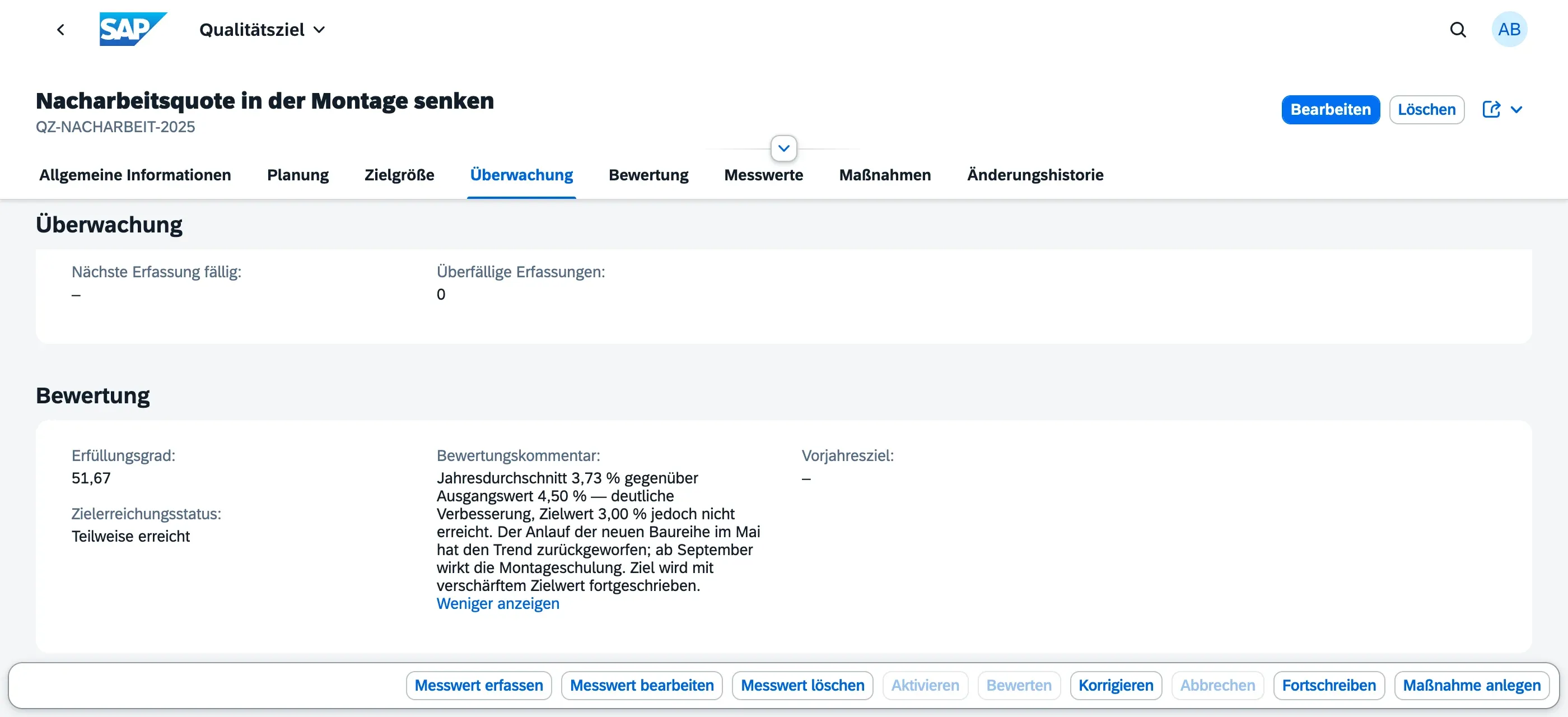
The evaluation comment is the record that gets read in the management review and in the audit. One sentence on the result, one on the cause of the deviation, and one on the consequence for the next period is enough — more is rarely read, less does not carry.
Carrying forward into the next period
Section titled “Carrying forward into the next period”Carry Forward (Fortschreiben) creates the next period’s objective from an evaluated one. Title, description, ownership, target metric, and the planning fields are carried over; the new period and target value are prompted for. The new objective’s baseline is automatically set to the previous period’s aggregated actual value — so the progress made is not lost but becomes the new starting point. Measurements are deliberately not copied; the new period starts with an empty series. The Previous Objective field keeps the chain of periods traceable.
The new objective is created as a Draft and needs editing before activation — in particular the code, which is copied unchanged. If you carry the period in your code, both objectives will otherwise show the same year.
Creating action items from an objective
Section titled “Creating action items from an objective”If an objective misses its target or slips into the warning or action band, create an action item directly from the object page via Create Action Item (Maßnahme anlegen); it is automatically linked to the quality objective. The action item then appears in the objective’s Action Items section as well as in the Action Workbench.
This is where tracking turns into doing: the quality objective states where the organization wants to go; the action item states who does what by when to get there.
Change history
Section titled “Change history”The Change History section logs changes to the target value, the period end date, and the status, with timestamp and user. The tracking is deliberately limited to those three fields: it answers whether an objective was weakened or extended after the fact — precisely the question ISO 9001 raises in 6.2.1 with its requirement that objectives be updated as appropriate. Free-text corrections to the description or the resources are not recorded.
Next steps
Section titled “Next steps”- Quality Objective Cockpit — cross-objective overview of all quality objectives with status, achievement, and outlier detection
- Action Workbench — track the action items created from objectives
- Roles & Permissions — who is allowed to do what across the system